COLOR statement
Purpose:
The COLOR statement sets the foreground and background
text color attributes specifying decimal values 0 to 15 to produce
the associated foreground and background text colors.
Syntax 1:
COLOR fg_color AS INTEGER, bg_color AS INTEGER
Parameters:
Syntax 2:
COLOR fg_color AS INTEGER
Parameters:
- Data type: INTEGER
fg_color Foreground color of the text, a
value from 0 to 15. The background color will be 0, black.
|
Remarks:
The COLOR statement will work only in console mode
programs.
👉 By default, the rendering of the color
of the text is done from RGB values in
the computer's registry. Because of this, the text colors will vary
according to the operating system of the machine and, as well in
some instances, the console in which the program is executed.
Example 1:
In the following example the background color is set to -1 to
instruct the COLOR command to retain and use the previous
background color.
COLOR 0, 1             ' A value of 1 sets the background color to blue
FOR INT i = 0 TO 15
 COLOR i, -1          ' -1 means the previous background color (blue) is used
 PRINT "This is something ... this is nothing."
NEXT
COLOR 7, 0
Example 2:
The following example displays the foreground colors and their
values derived from the computer's registry entries.
CONST HKCU = HKEY_CURRENT_USER
DIM AS STRING str0, str1, str2, str3
DIM AS STRING ColorTable, Colour, HTML

PRINT "                 COLORREF   HTML"
PRINT "                 0x00bbggrr #rrggbb"
PRINT
FOR INTEGER i = 0 TO 15
  str0 = STR$(i, 1)
  str1 = "COLOR " & LPAD$(str0, 2, 32)
  ColorTable = "ColorTable" & LPAD$(str0, 2, 48)
  str2 = HEX$(REGINT(HKCU, "Console", ColorTable))
  str3 = LPAD$(str2, 6, 48)
  Colour = str1 & " 0x00" & str3
  HTML = " #" & RIGHT$(str3, 2) & MID$(str3, 3, 2) & LEFT$(str3, 2)
  COLOR i, i
  PRINT "     ";
  COLOR 7, 0
  PRINT " ", Colour, HTML
  PRINT
NEXT i
Result:
The colors and values below were produced when the above code
was compiled and run in a cmd.exe console on Windows 10, OS Build
19043.1083.
                   COLORREF  HTML
                0x00bbggrr #rrggbb

       COLOR  0 0x000C0C0C #0C0C0C

       COLOR  1 0x00DA3700 #0037DA

       COLOR  2 0x00EA1130 #13A10E

       COLOR  3 0x00DD963A #3A96DD

       COLOR  4 0x001F0FC5 #C50F1F

       COLOR  5 0x00981788 #881798

       COLOR  6 0x009CC100 #C19C00

       COLOR  7 0x00CCCCCC #CCCCCC

       COLOR  8 0x00767676 #767676

       COLOR  9 0x00FF783B #3B78FF

       COLOR 10 0x00CC6160 #16C60C

       COLOR 11 0x00D6D661 #61D6D6

       COLOR 12 0x005648E7 #E74856

       COLOR 13 0x009E00B4 #B4009E

       COLOR 14 0x00A5F1F9 #F9F1A5

       COLOR 15 0x00F2F2F2 #F2F2F2
Example 2:
Here's a colorful, Win32 console version of Conway's Game of
Life. Compile as a console app and run it. Make sure your console
window is set to, at least, 80x25. When running, you can press any
key to start a new game. Ctrl C or click the X button on your
console to stop.
  '*************************************************************
  '  Conway's Game of Life
  '  https://en.wikipedia.org/wiki/Conway%27s_Game_of_Life
  '  BCX version by Kevin Diggins 2020
  '  Derived from an old ABC BASIC Packets demo (author unknown)
  '*************************************************************

  MACRO BOARD_X = 82        '  original = 82 - Adjust your console to match
  MACRO BOARD_Y = 25        '  original = 25 -            ditto
  MACRO ALIVE   = 38        '  original =  2 - Smiley face code point
  MACRO DEAD    = 32        '  original = 32 - Space char code point

  DIM b [BOARD_Y, BOARD_X]  '  Current generation matrix
  DIM c [BOARD_Y, BOARD_X]  '  Next generation matrix
  DIM k [BOARD_Y, BOARD_X]  '  I like colorful neighborhoods

  DIM Neighbors, x, y


  START_ME_UP:
  RANDOMIZE ( TIMER + RND )
  CLS


  FOR x = 1 TO BOARD_X - 2  ' Seed the opening board
    FOR y = 1 TO BOARD_Y - 2

      IF (RND * 10 ) > 5 THEN   ' coin toss method
        b[y, x] = ALIVE
        c[y, x] = ALIVE
        k[y, x] = RND2 (1, 15)
      ELSE
        b[y, x] = DEAD:
        c[y, x] = DEAD
        k[y, x] = RND2 (1, 15)
      END IF

      COLOR k[y, x], 0
      LOCATE y, x, 0
      PRINT CHR$ (b[y, x])

    NEXT
  NEXT


  DO  ' Run forever or until you press a key for a new game
    DOEVENTS  ' LIFE is intensive, so yield to Windows
    FOR x = 1 TO BOARD_X - 2
      FOR y = 1 TO BOARD_Y - 2
        Neighbors = 0
        IF c[y - 1, x]     = ALIVE THEN Neighbors = Neighbors + 1
        IF c[y - 1, x - 1] = ALIVE THEN Neighbors = Neighbors + 1
        IF c[y, x - 1]     = ALIVE THEN Neighbors = Neighbors + 1
        IF c[y + 1, x - 1] = ALIVE THEN Neighbors = Neighbors + 1
        IF c[y + 1, x]     = ALIVE THEN Neighbors = Neighbors + 1
        IF c[y + 1, x + 1] = ALIVE THEN Neighbors = Neighbors + 1
        IF c[y, x + 1]     = ALIVE THEN Neighbors = Neighbors + 1
        IF c[y - 1, x + 1] = ALIVE THEN Neighbors = Neighbors + 1

        IF Neighbors < 2 OR Neighbors > 3 THEN b[y, x] = DEAD
        IF Neighbors = 3                  THEN b[y, x] = ALIVE
      NEXT
    NEXT

    FOR x = 1 TO BOARD_X - 2
      FOR y = 1 TO BOARD_Y - 2
        LOCATE y, x, 0
        COLOR k[y, x], 0
        PRINT CHR$(b[y, x])
        c[y, x] = b[y, x]
      NEXT
    NEXT

    IF INSTAT THEN getch() : GOTO START_ME_UP ' If keypressed, run new game
  LOOP
BCX Console Sample Programs using the COLOR
statement.
POPCOLORS statement
Purpose:
After a COLOR
statement is executed, POPCOLORS
restores the console's foreground and background colors from those
saved by PUSHCOLORS before the COLOR
call.
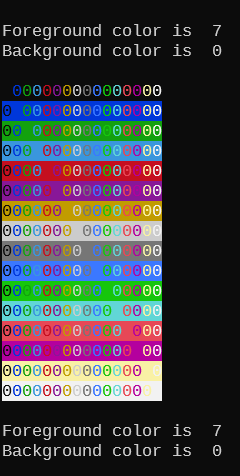
Example:
👉 If the following code, which displays
all possible console color combinations, is executed without the
PUSHCOLORS POPCOLORS
functions, upon exit, the console would be left with color
attributes of a white foreground on a white background.
$BCXVERSION "7.7.3"

?
PRINT "Foreground color is ", Color_FG
PRINT "Background color is ", Color_BG
?
PUSHCOLORS

DIM AS INTEGER BackGround
DIM AS INTEGER ForeGround

FOR BackGround = 0 TO 15
  FOR ForeGround = 0 TO 15
    COLOR ForeGround, BackGround
    PRINT "0";
  NEXT
  PRINT
NEXT

POPCOLORS
?
PRINT "Foreground color is ", Color_FG
PRINT "Background color is ", Color_BG
?
Result
QBCOLOR statement
Purpose:
QBCOLOR returns a COLORREF
expressed as a value in the range 0 through 4294967295. These
values can be used in any BCX GUI function
parameter that accepts a COLORREF value
as an argument.
Syntax:
RetVal = QBCOLOR(TheColor AS INTEGER)
Return Value:
- Data type: COLORREF
RetVal A value in the range 0 through
4294967295. The COLORREF
values shown have been chosen as seeking to represent the colors of
the QBASIC era.
Parameters:
- Data type: INTEGER
TheColor The required argument is an integer
in the range 0-31, colors 16 thru 31 provide softer, pastel
versions of colors 0 through 15.
|
Remarks:
The table below shows the COLORREF
return values from calls to the QBCOLOR
function, expessed as integer and hexadecimal. Also shown is their
equivalent in HTML format, and color swatches of those values.
👉 QBCOLOR
values differ, slightly, from the color values used by the
COLOR statement. There is no BCX function to use
COLORREF values on a text console.
        QBCOLOR    COLORREF   Hex COLORREF    HTML
                              0x00BBGGRR    #rrggbb

           0             0    0x00000000    #000000

           1      11010048    0x00A80000    #0000a8

           2         43008    0x0000A800    #00a800

           3      11053056    0x00A8A800    #00a8a8

           4           168    0x000000A8    #a80000

           5      11010216    0x00A800A8    #a800a8

           6         21672    0x000054A8    #a85400

           7      11053224    0x00A8A8A8    #a8a8a8

           8       5526612    0x00545454    #545454

           9      16536660    0x00FC5454    #5454fc

          10       5569620    0x0054FC54    #54fc54

          11      16579668    0x00FCFC54    #54fcfc

          12       5526780    0x005454FC    #fc5454

          13      16536828    0x00FC54FC    #fc54fc

          14       5569788    0x0054FCFC    #fcfc54

          15      16579836    0x00FCFCFC    #fcfcfc

          16      10790052    0x00A4A4A4    #a4a4a4

          17      16752768    0x00FFA080    #80a0ff

          18      10551200    0x00A0FFA0    #a0ffa0

          19      16777120    0x00FFFFA0    #a0ffff

          20      10526975    0x00A0A0FF    #ffa0a0

          21      16752895    0x00FFA0FF    #ffa0ff

          22      10551295    0x00A0FFFF    #ffffa0

          23      13948116    0x00D4D4D4    #d4d4d4

          24      11842740    0x00B4B4B4    #b4b4b4

          25      16768188    0x00FFDCBC    #bcdcff

          26      14483420    0x00DCFFDC    #dcffdc

          27      16777180    0x00FFFFDC    #dcffff

          28      14474495    0x00DCDCFF    #ffdcdc

          29      16768255    0x00FFDCFF    #ffdcff

          30      14483455    0x00DCFFFF    #ffffdc

          31      15000804    0x00E4E4E4    #e4e4e4