MSGBOX function
Purpose:
The MSGBOX function creates, displays, and operates a
message box. The message box contains a message and title, plus a
combination of icons and push buttons.The MSGBOX
function does return a value and the arguments must be in
parentheses.
Syntax:
RetVal = MSGBOX(Msg AS STRING, Title AS STRING, Contents_and_Behavior AS INTEGER)
Return Value:
- Data type: INTEGER
RetVal The return value is zero if there is
not enough memory to create the message box. If the function
succeeds, the return value, is one of the following:
Return Code
Value Constant |
Decimal
Value |
Description |
| IDOK
|
1 |
OK button was selected. |
| IDCANCEL
|
2 |
Cancel button was selected. |
| IDABORT
|
3 |
Abort button was selected. |
| IDRETRY
|
4 |
Retry button was selected. |
| IDIGNORE
|
5 |
Ignore button was selected. |
| IDYES
|
6 |
Yes button was selected. |
| IDNO
|
7 |
No button was selected. |
| IDTRYAGAIN
|
10 |
Try Again button was selected. |
| IDCONTINUE
|
11 |
Continue button was selected. |
If a message box has a Cancel button, the function
returns the IDCANCEL value if either the
ESC key is pressed or the Cancel button is selected. If the
message box has no Cancel button, pressing ESC has no effect
- unless an MB_OK button is present. If an
MB_OK button is displayed and the user presses ESC, the return
value will be IDOK.
Parameters:
- Data type: STRING
Msg A string variable or literal that
contains the message to be displayed.
- Data type: STRING
Title A string variable or literal that
contains the title that will appear on the top of the message
box.
- Data type: INTEGER
Contents_and_Behavior A set of bit flags
that determine the contents and behavior of the dialog box. This
parameter can be a combination of flags from the following tables.
Buttons
Flag |
Decimal
Value |
Buttons
to be
Displayed |
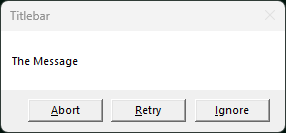
| MB_ABORTRETRYIGNORE
|
2 |
|
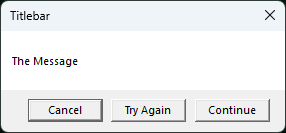
| MB_CANCELTRYCONTINUE
|
6 |
|
| MB_HELP
|
16384 |
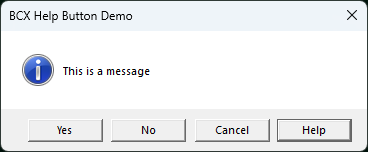
When the user clicks the Help button or presses F1, the system
sends a WM_HELP message to the owner.
👉 MB_HELP flag
cannot be used in a console. |
| MB_OK
|
0 |
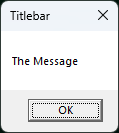
Default |
| MB_OKCANCEL
|
1 |
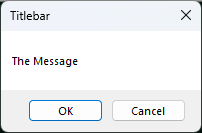
|
| MB_RETRYCANCEL
|
5 |
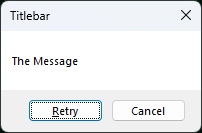
|
| MB_YESNO
|
4 |
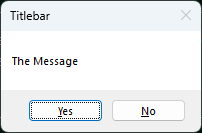
|
| MB_YESNOCANCEL
|
3 |
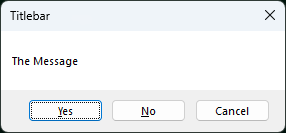
|
Icons
Flag |
Decimal
Value |
Icons
to be
Displayed |
Icon Image |
| MB_ICONEXCLAMATION
|
48 |
Exclamation-point icon displayed. |

|
| MB_ICONWARNING
|
48 |
Exclamation-point icon displayed. |
|
| MB_ICONINFORMATION
|
64 |
Lowercase letter i in a circle icon displayed. |

|
| MB_ICONASTERISK
|
64 |
Lowercase letter i in a circle icon displayed. |
|
| MB_ICONQUESTION
|
32 |
Question-mark icon displayed. |

|
| MB_ICONSTOP
|
16 |
Stop-sign icon displayed. |

|
| MB_ICONERROR
|
16 |
Stop-sign icon displayed. |
|
| MB_ICONHAND
|
16 |
Stop-sign icon displayed. |
|
Default Button
Flag |
Decimal
Value |
Default Button |
| MB_DEFBUTTON1
|
0 |
First button is the default. |
| MB_DEFBUTTON2
|
256 |
Second button is the default. |
| MB_DEFBUTTON3
|
512 |
Third button is the default. |
| MB_DEFBUTTON4
|
768 |
Fourth button is the default. |
Modality
Flag |
Decimal
Value |
Modality Description |
| MB_APPLMODAL
|
0 |
The user must respond to the message box before continuing work
in the parent window of the message box. Depending on the hierarchy
of windows in the application, the user may be able to move to
other windows within the application. All child windows of the
parent of the message box are automatically disabled, but popup
windows are not. However, the user can move to and work in other
application windows. MB_APPLMODAL is the
default if neither MB_SYSTEMMODAL nor
MB_TASKMODAL is specified. |
| MB_SYSTEMMODAL
|
4096 |
Same as MB_APPLMODAL except that the
message box has the WS_EX_TOPMOST style. Use system-modal message
boxes to notify the user of serious, potentially damaging errors
that require immediate attention, for example, running out of
memory. This flag has no effect on the user's ability to interact
with windows other than those associated with the parent window of
the message box. |
| MB_TASKMODAL
|
8192 |
Same as MB_APPLMODAL except that all
the top-level windows belonging to the current task are disabled if
the handle to the owner window of the message box is NULL. Use this
flag when the calling application or library does not have a window
handle available but still needs to prevent input to other windows
in the current application without suspending other
applications. |
Optional Arguments
Flag |
Decimal
Value |
Optional Arguments Description |
| MB_DEFAULT_DESKTOP_ONLY
|
0131072 |
The desktop currently receiving input must be a default
desktop; otherwise, the function fails. A default desktop is one an
application runs on after the user has logged on. |
| MB_RIGHT
|
524288 |
The text is right-justified. |
| MB_RTLREADING
|
1058476 |
Displays message and caption text using right-to-left reading
order on Hebrew and Arabic systems. |
| MB_SETFOREGROUND
|
65536 |
The message box becomes the foreground window. Internally,
Windows calls the SetForegroundWindow function for the message
box. |
| MB_TOPMOST
|
262144 |
MessageBox is WS_EX_TOPMOST style |
| MB_SERVICE_NOTIFICATION
|
2097152 |
Send a message from a service to a user. |
|
Example 1:
DIM ButtonSelected
DIM AS STRING TheMessage

TheMessage = "This is the message." & CRLF$ & "Click a button."

DO
  ButtonSelected = MSGBOX(TheMessage, "MSGBOX Demo", _
  MB_YESNOCANCEL OR MB_ICONINFORMATION)

  SELECT CASE ButtonSelected
  CASE IDCANCEL
    MSGBOX "You pressed the Cancel button.", "MSGBOX Demo", MB_OK
    END
  CASE IDYES
    MSGBOX "You pressed the Yes button.", "MSGBOX Demo", MB_OK
  CASE IDNO
    MSGBOX "You pressed the No button." , "MSGBOX Demo", MB_OK
  END SELECT

LOOP
Example 2:
This example shows the setup for a Help button on the MSGBOX
GUI "MSGBOX_Help"

SUB FORMLOAD
  GLOBAL Form1 AS HWND
  Form1 = BCX_FORM("MSGBOX_Help", 0, 0, 130, 110)
  CENTER(Form1)
  SHOW(Form1)
  DIM ButtonMsg
  DO
    ButtonMsg = MSGBOX("This is a message", "BCX Help Button Demo", _
                MB_YESNOCANCEL OR MB_ICONINFORMATION _
                OR MB_HELP OR MB_DEFBUTTON4)

    SELECT CASE ButtonMsg
    CASE IDCANCEL
      MSGBOX "You pressed the Cancel button.", "BCX Demo", MB_OK
      END
    CASE IDYES
      MSGBOX "You pressed the Yes button.", "BCX Demo", MB_OK
    CASE IDNO
      MSGBOX "You pressed the No button." , "BCX Demo", MB_OK
    END SELECT

  LOOP
END SUB

BEGIN EVENTS
  SELECT CASE CBMSG
  CASE WM_HELP
    MSGBOX "You pressed the Help button." , "BCX Demo", MB_OK
    EXIT FUNCTION
  CASE WM_CLOSE
    DestroyWindow(Form1)
    EXIT FUNCTION
  END SELECT
END EVENTS
MSGBOX statement
Purpose:
The MSGBOX statement creates a message box which does
not return a value and therefore can function only as a
notification messenger.
👉 The MSGBOX
statement arguments must not be in parentheses.
Syntax:
MSGBOX Msg AS STRING [, Title AS STRING, Contents_and_Behavior AS INTEGER]
Parameters:
- Data type: STRING
Msg A string variable or literal that
contains the message to be displayed.
- Data type: STRING
Title [OPTIONAL] A
string variable or literal that contains the title that will appear
on the top of the message box.
- Data type: INTEGER
Contents_and_Behavior [OPTIONAL] A set of bit flags that determine the
contents and behavior of the dialog box.
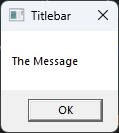
👉 If a Contents_and_Behavior parameter argument is not made,
then BCX will provide the MB_SYSTEMMODAL
flag argument in the default MSGBOX
statement C code translation. For
example,
MSGBOX "The Message", "Titlebar"
will translate to C code
MessageBox (GetActiveWindow(),"The Message","Titlebar",MB_SYSTEMMODAL );
Result:
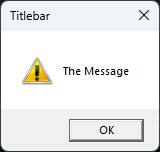
However, if a Contents_and_Behavior
parameter argument is made, then the MSGBOX
statement C code translation does not
include the MB_SYSTEMMODAL flag. For
example,
MSGBOX "The Message", "Titlebar", MB_ICONEXCLAMATION
will translate to C code
MessageBox (GetActiveWindow(),"The Message","Titlebar",MB_ICONEXCLAMATION );
Result:
The Contents_and_Behavior parameter can be a
combination of flags from the following list.
Icons
Flag |
Decimal
Value |
Icons
to be
Displayed |
Icon Image |
| MB_ICONEXCLAMATION
|
48 |
Exclamation-point icon displayed. |
|
| MB_ICONWARNING
|
48 |
Exclamation-point icon displayed. |
|
| MB_ICONINFORMATION
|
64 |
Lowercase letter i in a circle icon displayed. |
|
| MB_ICONASTERISK
|
64 |
Lowercase letter i in a circle icon displayed. |
|
| MB_ICONQUESTION
|
32 |
Question-mark icon displayed. |
|
| MB_ICONSTOP
|
16 |
Stop-sign icon displayed. |
|
| MB_ICONERROR
|
16 |
Stop-sign icon displayed. |
|
| MB_ICONHAND
|
16 |
Stop-sign icon displayed. |
|
Modality
Flag |
Decimal
Value |
Modality Description |
| MB_APPLMODAL
|
0 |
The user must respond to the message box before continuing work
in the parent window of the message box. Depending on the hierarchy
of windows in the application, the user may be able to move to
other windows within the application. All child windows of the
parent of the message box are automatically disabled, but popup
windows are not. However, the user can move to and work in other
application windows. MB_APPLMODAL is the
default if neither MB_SYSTEMMODAL nor
MB_TASKMODAL is specified. |
| MB_SYSTEMMODAL
|
4096 |
Same as MB_APPLMODAL except that the
message box has the WS_EX_TOPMOST style. Use system-modal message
boxes to notify the user of serious, potentially damaging errors
that require immediate attention, for example, running out of
memory. This flag has no effect on the user's ability to interact
with windows other than those associated with the parent window of
the message box. |
| MB_TASKMODAL
|
8192 |
Same as MB_APPLMODAL except that all
the top-level windows belonging to the current task are disabled if
the handle to the owner window of the message box is NULL. Use this
flag when the calling application or library does not have a window
handle available but still needs to prevent input to other windows
in the current application without suspending other
applications. |
Optional Arguments
Flag |
Decimal
Value |
Optional Arguments Description |
| MB_DEFAULT_DESKTOP_ONLY
|
0131072 |
The desktop currently receiving input must be a default
desktop; otherwise, the function fails. A default desktop is one an
application runs on after the user has logged on. |
| MB_RIGHT
|
524288 |
The text is right-justified. |
| MB_RTLREADING
|
1058476 |
Displays message and caption text using right-to-left reading
order on Hebrew and Arabic systems. |
| MB_SETFOREGROUND
|
65536 |
The message box becomes the foreground window. Internally,
Windows calls the SetForegroundWindow function for the message
box. |
| MB_TOPMOST
|
262144 |
MessageBox is WS_EX_TOPMOST style |
| MB_SERVICE_NOTIFICATION
|
2097152 |
Send a message from a service to a user. |
|
Remarks:
If you want the same behavior as the default MSGBOX
statement when using MSGBOX as a
FUNCTION, you will have to include the MB_OK and MB_SYSTEMMODAL flags
yourself.
Example:
DIM i
i = MSGBOX ("The Message", "The Titlebar", MB_OK | MB_SYSTEMMODAL)
PRINT i
PAUSE